This article provides an overview of the available Attract 2.1 templates and a complete reference for all MAML variables, including short descriptions for each field. This documentation is intended to support onboarding, internal training, and self-service operations for the team.
ATR 2.1 currently provides four page templates:
Template Name:
Survey2025-Bootstrap5-Voice-ChatDescription: Primary template for the survey interface, built with Bootstrap 5 and integrated with the voice + chat AI interaction module.
Template Name:
SurveyNonAI-Bootstrap5Description: Primary template for the survey interface, built with Bootstrap 5, without the voice and chat AI interaction modules.
Template Name:
Thankyou2025-Bootstrap5-Voice-ChatDescription: Completion page shown after the survey is submitted. Uses the same template family to ensure UI consistency, with the voice and chat AI interaction modules included.
Template Name:
ThankyouNonAI-Bootstrap5Description: Completion page shown after the survey is submitted. Uses the same template family to ensure UI consistency, without the voice or chat AI interaction modules.
MAML variables are grouped into two major categories:
- UI Configuration
- AI SDK Configuration
These variables control branding, typography, colors, contact information, and all UI/UX elements of the Survey and Thank You pages.
| Variable | Type | Description | Example |
|---|---|---|---|
| company_name | string | Displayed company name used in branding elements | MindFire, Inc |
| company_address | string | Company’s physical mailing address | 123 Main Street, Anytown CA |
| color_text | string | Default text color for body and content areas | #000844 |
| color_page_bg | string | Background color for main page layout | #ffffff |
| color_navbar | string | Background color of the navigation bar | #f8f9fa |
| color_navbar_text | string | Text color used inside navigation bar | #212529 |
| call_in_number | string | Company’s public support or contact phone number | 949-222-3344 |
| font_family_headlines | string | Font family used for main titles and headers | Poppins |
| font_family_body | string | Font family used for paragraph text | Roboto |
| color_primary_hex | string | Primary brand color in HEX format | #ff6633 |
| color_primary_rgb | string | Primary color in RGB format | 255,102,51 |
| color_secondary_hex | string | Secondary brand color (HEX) | #081e35 |
| color_secondary_rgb | string | Secondary brand color (RGB) | 8,30,53 |
| Survey_Text | string | Intro text explaining the survey benefits | Summarize the key benefits for prospects... |
| Survey_Form | html/string | HTML markup for the survey form fields that include the voice button | <form> ... </form> (shortened) |
| Survey_FormNonAI | html/string | HTML markup for the survey form fields without the voice button | <form> ... </form> (shortened) |
| Survey_Form_Header_Text | string | Header text displayed above the survey form | ##firstname##, we have something for you. |
| Survey_Form_Footer_Text | string | Footer text below the form | Footer Text |
| Voice_Button | html/string | Embedded voice chat component tied to the AI agent | <voice-chat-component ...> (shortened) |
| Thankyou_Text | string | Thank you message | Thank your prospect and provide helpful links. |
| favicon_url | string | URL of the browser tab favicon | https://.../favicon.jpg |
| img_bg_url | string | Background image for the survey | https://.../background.png |
| logo_url | string | Company logo image URL | https://.../logo.jpg |
| privacy_url | string | URL to the Privacy Policy page | https://www.mindfireinc.com |
These variables control the behavior of the AI Agent embedded in the survey experience.
| Variable | Type | Description | Example |
|---|---|---|---|
| ai_agent | string | Name of the AI agent | Meya |
| ai_agent_id | string | Unique agent ID from the AI platform | 6916b11b34e3e27f6573db1e |
| ai_connect | string | Defines when the AI should establish connection: automatically on page load (auto) or only after the user clicks the connect button (manual). | manual |
| ai_mute_on_start | string | Determines whether the AI starts muted or unmuted | unmute |
| REMOTEACCESSID | string | Access token used for connecting the AI session | 686645cfc36d5f908c0d985c |
| REMOTEACCESSMIDSN | string | Access Token for Informed Delivery | 689539524f73a7cbce9b4bb5 |
| DVACCOUNTID | string | Account ID | 37722 |
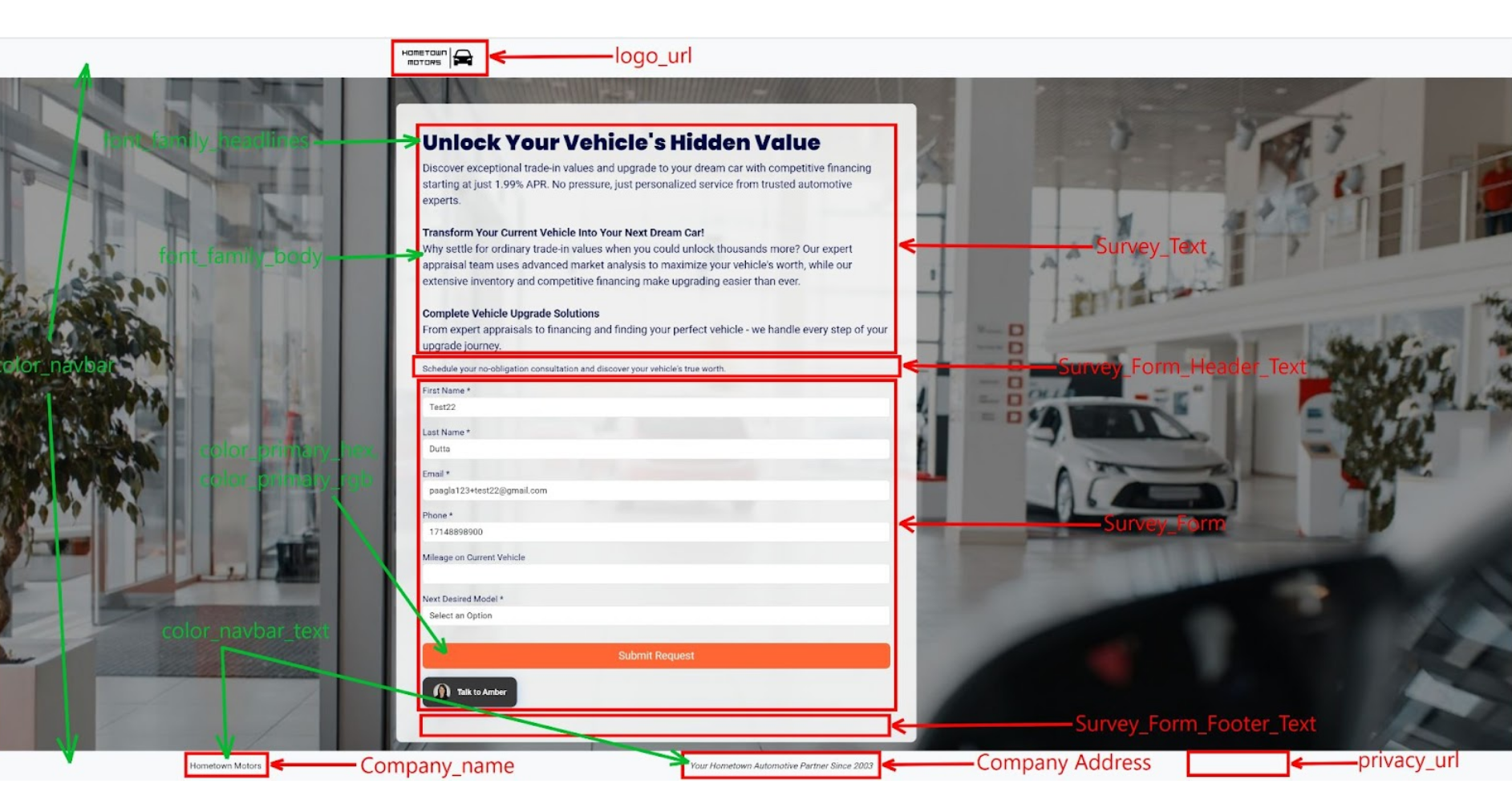
The slide below provides a visual map of where each MAML UI variable appears within the Survey template. It helps you quickly understand how elements such as branding, colors, typography, and form content are rendered on the page.
Was this article helpful?
That’s Great!
Thank you for your feedback
Sorry! We couldn't be helpful
Thank you for your feedback
Feedback sent
We appreciate your effort and will try to fix the article